Peachy Script: A Font for Polished Branding
It was a busy morning at the café, and I was updating the menu to reflect new seasonal offerings. The old design felt a bit tired, and I wanted something that would make the café feel fresh and welcoming. That’s when I decided to try Peachy Script on the menu headers. The difference was immediate—there was a soft elegance that made the whole layout feel more refined.
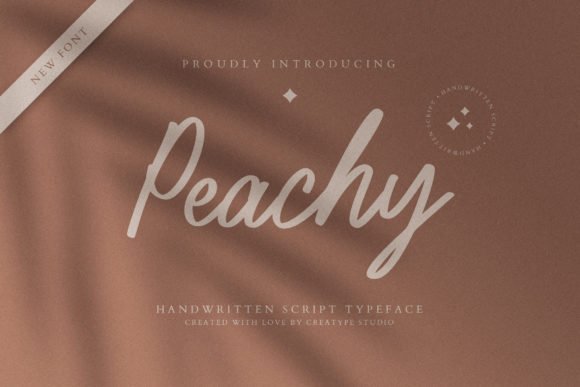
Peachy Script is a script font with a modern yet classic feel. Its flowing lines and gentle curves give it a sense of warmth and sophistication. It’s not too ornate, which makes it versatile for a range of applications. Whether you’re designing a logo, crafting packaging, or adding a touch of personality to social media posts, Peachy Script can bring a sense of grace to your brand materials.
How Peachy Script Enhances Brand Identity
For small businesses, consistency in branding is key. Peachy Script helps create a cohesive look across all customer-facing materials. Imagine using it on a bakery box, a skincare label, or a candle jar. The font adds a personal touch without being overwhelming. It works well for headlines, short phrases, and logos, making it ideal for display text and decorative accents.
One of the things I love about Peachy Script is how it balances creativity with readability. Even on small labels or mobile screens, the font remains clear and legible. This makes it a great choice for product tags, stickers, and digital ads where space is limited.
Real-World Applications for Peachy Script
Take a beauty brand, for example. They often need to convey a sense of luxury and care through their packaging. Using Peachy Script on product names or taglines can help reinforce that image. It also pairs well with other fonts, like a clean sans serif or an elegant serif, allowing for a balanced and professional look.
Another practical use is in social media graphics. Whether it’s a promotional post or an Instagram story, Peachy Script can add a stylish flair. It’s especially effective when used as a headline or a callout, drawing attention while maintaining a sense of refinement.
Typography Tips for Small Business Owners
When working with a script font like Peachy Script, it’s important to consider how it will be used. For instance, on printed packaging, it’s best to keep text short and centered to avoid clutter. On digital platforms, such as website banners or online shop visuals, using it for headings or subheadings can enhance visual hierarchy without sacrificing clarity.
Font pairing is another consideration. Combining Peachy Script with a simple sans serif can create contrast and balance. This approach is great for business cards, flyers, or email newsletters where both style and readability are important.
Why Peachy Script Stands Out
What sets Peachy Script apart is its ability to feel both modern and timeless. It’s a premium font that can elevate a brand without feeling overly complicated. It’s also part of the Script Amp collection, which offers a variety of script styles tailored for different design needs.
Before using any font, especially for commercial purposes, it’s wise to check the licensing terms. Peachy Script includes multiple file formats and styles, making it adaptable for various projects. Whether you're creating a logo, designing packaging, or building a consistent brand identity, this font offers flexibility and quality.
As a creative consultant, I’ve seen how typography can transform a brand. Peachy Script isn’t just a font—it’s a tool for storytelling. It helps small businesses communicate their values and personality in a way that feels authentic and professional. With the right application, it can make a lasting impression on customers and set a brand apart from the competition.